Vistra Corp (VST) is a US power sector stock listed on the New York Stock Exchange (NYSE), trading under the ticker VST. When trading VST on Gate Stocks, all actions must be verified directly on the platform page: confirm the name, ticker, market, order type, available balance, fee rules, and trading status one by one.
Vistra (VST) provides a foundational overview of VST from the perspectives of company structure, generation asset portfolio, and Gate trading workflow. Prior to placing an order, distinguish between the company's business fundamentals and the specific trading rules displayed on the platform. The Vistra business model details how natural gas, nuclear, energy storage, and retail electricity contribute to its revenue—these should not be conflated with order types, fee fields, or available USDT balances.
For best practice, first confirm that your account and USDT are eligible for stock trading, then search for Vistra Corp using the ticker VST, and finally select the order type and review your trading history. The US electric utility sector features multiple companies with similar names or business models; verifying by ticker helps prevent confusion with peers such as Constellation Energy (CEG), NextEra, or Duke Energy.
What Should You Prepare Before Buying Vistra (VST) on Gate?
Before trading VST with USDT, ensure your account status, identity verification, stock trading permissions, available USDT, product availability, and regional eligibility all meet requirements. Platform rules may vary by account type and region, so rely on the features and restrictions displayed on the Gate Stocks page.
The goal of the preparation stage is not to place an order, but to eliminate basic obstacles: inability to trade, unavailable funds, ticker confusion, or fee misinterpretation. If any preparation item is unclear, you may encounter issues such as “able to view quotes but unable to submit orders” or “order amount does not match available balance.”
| Preparation Item |
Checklist |
Common Impact |
| Account Permissions |
Stocks/US stock trading enabled |
Determines if orders can be submitted |
| USDT Funds |
Available USDT transferred to stock account |
Affects order size and tradable quantity |
| Product Availability |
VST page displays tradable status |
Determines if orders can be submitted |
| Asset Identification |
Name, ticker VST, and NYSE info match |
Ensures correct stock selection |
| Fee Rules |
Trading fee, minimum unit, settlement method |
Impacts actual trades and position records |
This checklist separates “page visibility” from “order eligibility.” Only after confirming account, permissions, funding, product status, and fee rules should you proceed to search and place an order.
Step 1: How to Prepare USDT and Your Stock Trading Account?
Trading US stocks on Gate Stocks usually requires account status verification, identity authentication, confirmation of stock trading permissions, and ensuring USDT is available in your stock account. Note that available USDT for stock trading may differ from your spot account balance—confirm that funds are designated for stock orders before trading.
Also review network deposit status, account transfers, available balance, and frozen funds. If USDT is pending, transfer is incomplete, or funds are locked by other orders, your displayed purchasing power may be lower than your total account balance.
Step 2: How to Search for VST / Vistra Corp on Gate Stocks?
On the Gate Stocks page, enter VST in the search bar. The platform should display Vistra Corp or the equivalent stock name. Verifying both ticker and company name is the first safeguard, especially as the energy and utilities sector includes several similar companies.
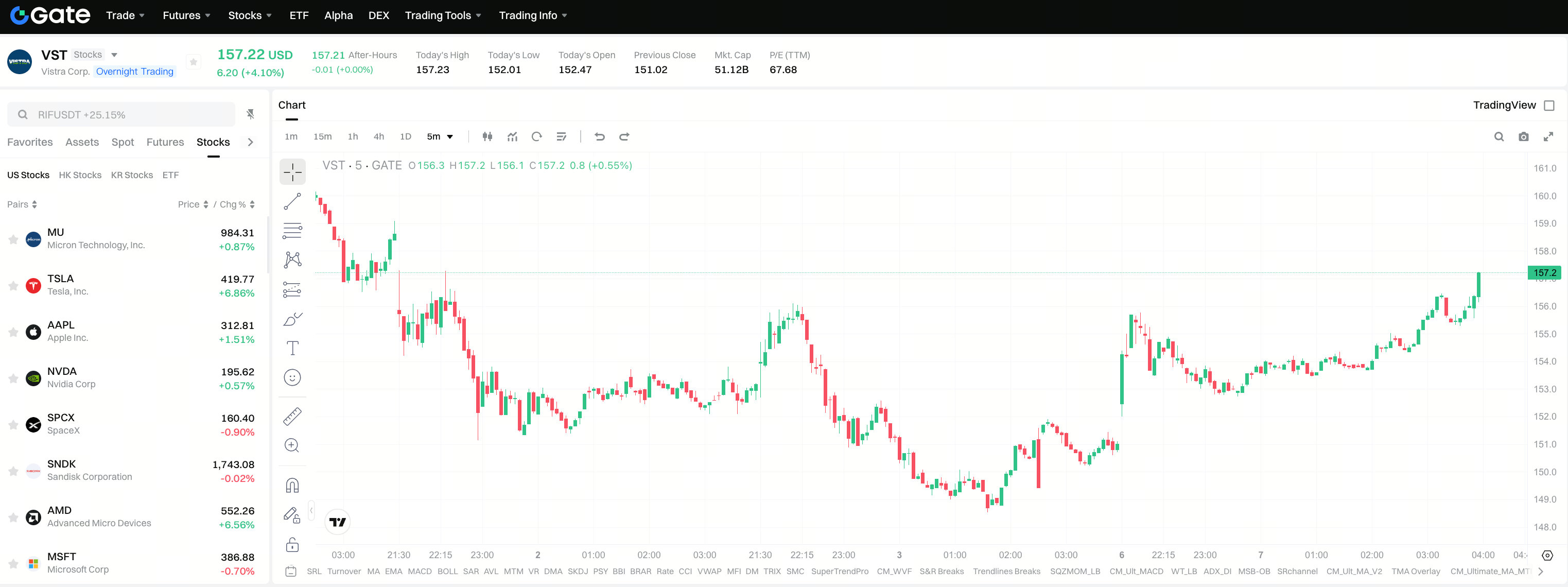
If search results include other power, nuclear, utility, or energy stocks, always confirm with both ticker and full English company name. Do not confuse VST with CEG, NextEra, Duke Energy, or other electric utility stocks. VST vs CEG vs NextEra vs Duke offers a comparison of industry peers by asset type and regulatory exposure. Vistra Corp trades on the NYSE; if only an abbreviation is displayed, cross-check company name and market details.
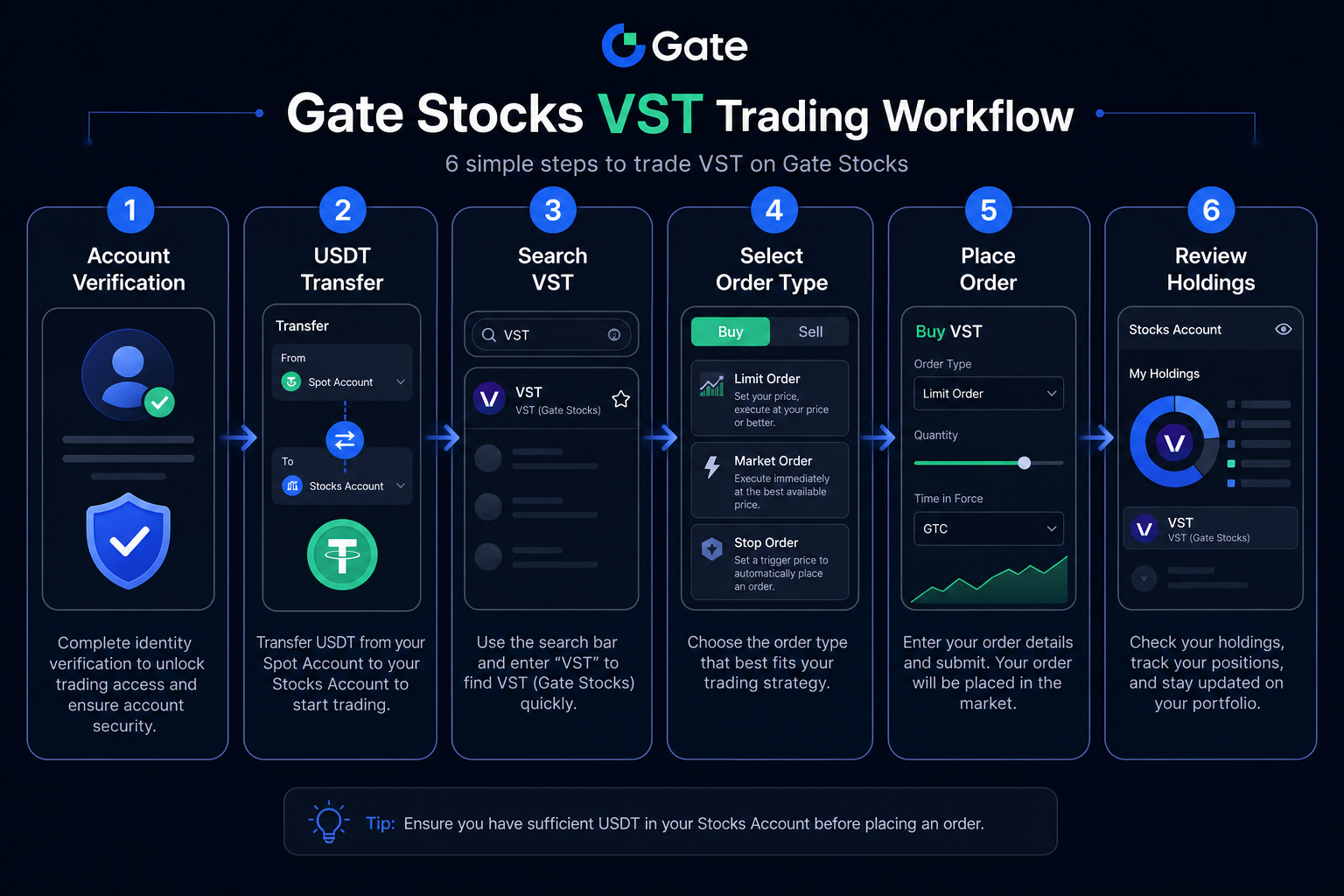
Figure 1. VST trading workflow on Gate Stocks: verify account, transfer USDT, search VST, confirm Vistra Corp, select order type, and review holdings.
Step 3: How to Place a Buy/Trade Order for Vistra (VST)?
On the VST trading page, sequentially confirm order direction, order type, quantity or amount, estimated execution amount, trading fee, and available account balance. Before submitting, double-check the stock name and ticker to avoid misidentification in trade records.
Common order types include limit and market orders. Limit orders let users set price conditions; market orders execute at the best available price. Neither order type is inherently superior—their differences lie in execution logic, speed, and price control.
| Order Type |
Key Checklist |
Possible Outcome |
| Limit |
Price, quantity, validity |
May not execute if price isn’t met |
| Market |
Available balance, liquidity |
Execution price may differ from estimate |
| Partial Fill |
Filled amount, remaining order |
Positions and balance update accordingly |
This table clarifies the distinction between order types and statuses. Before submitting, use the confirmation modal, fee prompt, and order direction as your final checkpoints.
After placing an order, check status in open orders, trading history, or holdings. Verify that average price, quantity, fee, and ticker VST are all accurate.
What Fees and Order Rules Require Confirmation When Trading Vistra (VST)?
Gate’s trading page displays trading fee, spread, order execution price, minimum trading unit, trading hours, and other relevant prompts. Rules may differ by product or region, so always refer to the information shown on the trading page.
In addition to trading fees, consider execution costs. Market orders may incur price differences due to liquidity; limit orders may remain unfilled if price conditions are unmet. Trading fee, spread, minimum unit, and trading hours should be reviewed together with the fee and risk checklist in the next section.
What Risks Should You Understand Before Buying/Trading Vistra (VST)?
Distinguish between trading process risks and company fundamentals. Trading process risks include ticker selection errors, misunderstanding order types, unclear fee rules, trading hour limitations, and liquidity shifts. Company fundamentals risks involve nuclear operations, natural gas costs, ERCOT and PJM price volatility, retail competition, and regulatory changes. There may also be settlement or fee discrepancies between USDT holdings and stock prices. Before trading, use the VST risk metrics checklist to review company variables, then verify available balance and fees as shown on the platform.
| Checklist Dimension |
Typical Content |
Purpose |
| Fees & Spread |
Trading fees, bid-ask spread |
Confirm actual execution cost |
| Asset Identification |
Tickers for VST, CEG, etc. |
Prevent buying the wrong stock |
| Market Exposure |
ERCOT/PJM price and capacity swings |
Understand price volatility sources |
| Operations & Regulation |
Nuclear availability, gas costs, compliance |
Separate fundamentals from trading steps |
This checklist merges fee rules, operational risk, and company fundamentals into one reference. As an integrated generation and retail company, Vistra Corp should not be reduced to a single label like “nuclear” or “AI power”—always perform a comprehensive review.
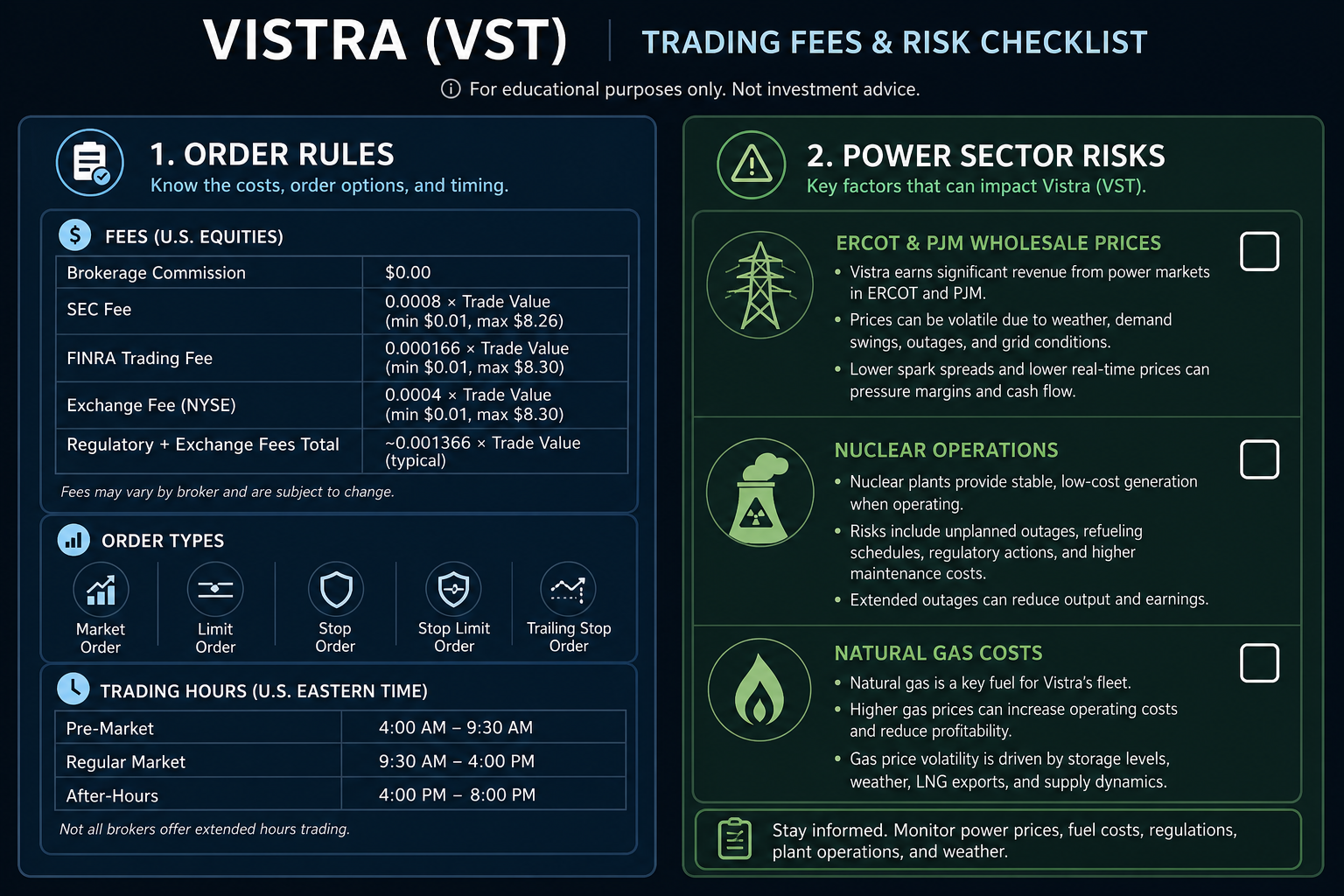
Figure 2. VST trading fees and risk checklist: always review order rules separately from risk factors such as ERCOT/PJM exposure, nuclear operations, and natural gas costs.
Summary
Trading Vistra Corp (VST) with USDT on Gate Stocks is a standardized process: prepare your account and USDT, search for ticker VST, verify stock details, select order type, confirm fee rules, and review holdings post-trade. The trading page addresses operational steps; the company overview and risk checklist support asset understanding. Keep these two categories distinct.
FAQ
What Should I Prepare Before Buying Vistra (VST) on Gate?
Ensure your account has completed identity verification, has Stocks trading permission, USDT has been transferred to the stock order account, and the VST page shows tradable status. Also confirm ticker VST matches Vistra Corp, and review platform rules for fees and minimum trading unit.
How Do I Search for Vistra (VST) on Gate Stocks?
Enter ticker VST in the Gate Stocks search bar. The page should show Vistra Corp and NYSE market info. If CEG, NextEra, or other power stocks appear, confirm with ticker and full company name to avoid errors.
How Do I Place an Order to Trade VST on Gate?
On the VST trading page, confirm order direction, type (limit or market), quantity or amount, estimated fees, and available balance. Before submitting, verify the stock name and ticker again. After execution, review average price, quantity, and fee fields in your order history and holdings.
What Fees Need Confirmation When Trading VST?
Trading fees, bid-ask spread, minimum trading unit, and trading hours are all determined by the VST trading page. Market orders may incur price differences due to liquidity; limit orders may not execute if price isn’t met. Each has a different cost structure.
What Risks Should I Understand Before Buying VST?
Trading process risks include ticker selection errors, misunderstanding order types, unclear fees, and USDT accounting differences. Company fundamentals risks include nuclear operations, ERCOT/PJM price volatility, natural gas costs, and retail competition. Evaluate these risk types separately.
How Does Trading VST on Gate Stocks Differ from Traditional Brokers?
Gate Stocks uses platform accounts and USDT for trading, while traditional brokers use local securities accounts and fiat currencies. Product rules, fee structures, and rights arrangements are determined by the Gate platform—do not assume they match traditional broker practices.