


Âmbito de Aplicação
Este guia aplica-se ao Gate Web
Antes de começar: Certifique-se de que tem uma ordem P2P ativa e já tentou contactar a contraparte
Tempo estimado: 5 minutos
Objetivo
Este guia irá orientá-lo sobre como submeter e retirar uma reclamação relativa a uma ordem P2P pendente no Gate Web.
Passos
Passo 1: Aceda à Página de Reclamações
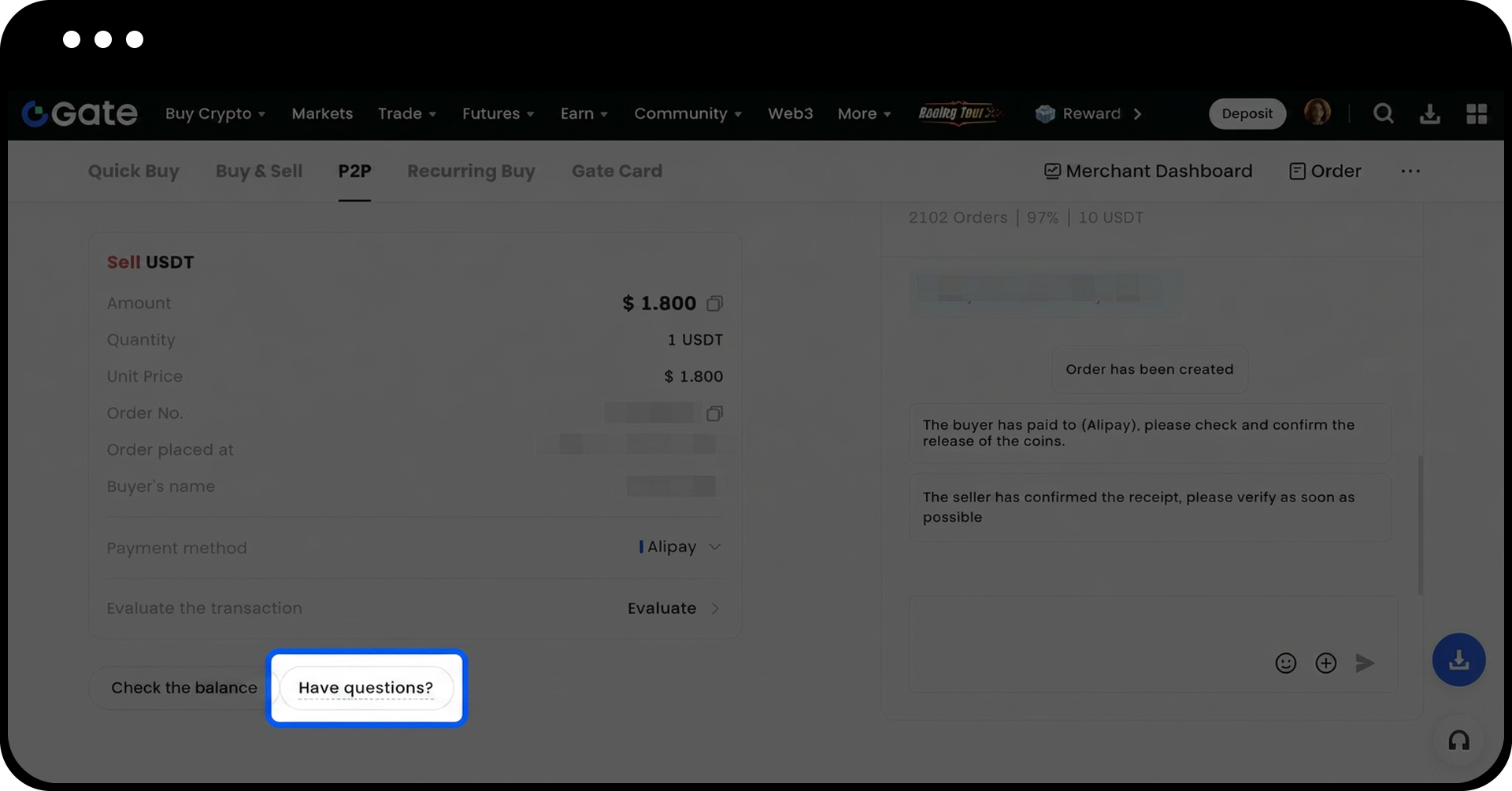
Na página da ordem P2P, clique em [Tem dúvidas?] para iniciar o processo de reclamação.
Passo 2: Escolha o Método de Resolução do Problema
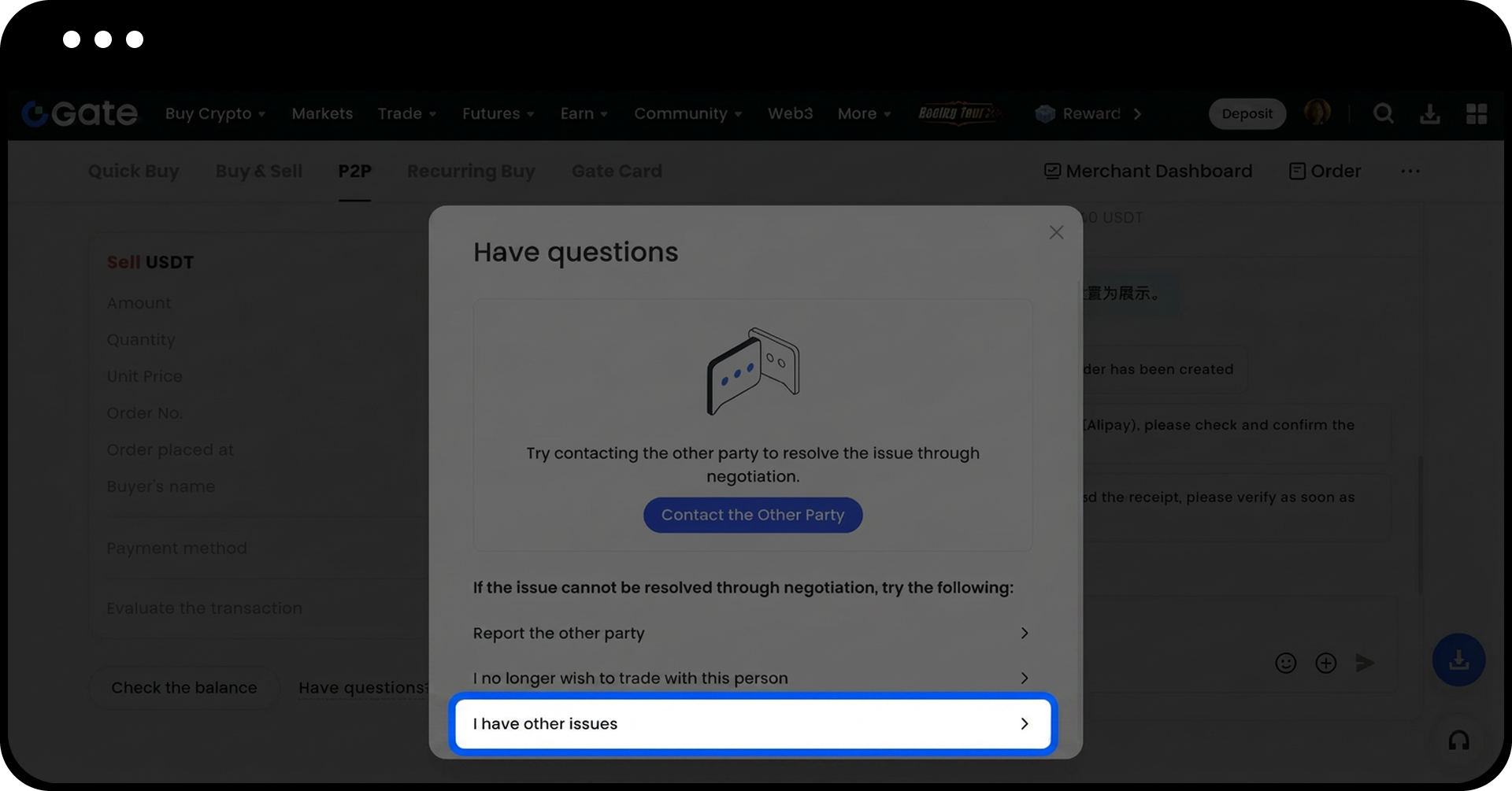
Selecione uma das seguintes opções consoante a sua situação:
- [Contactar a contraparte]: Tente resolver o problema através de comunicação direta
- [Denunciar a contraparte]: Utilize esta opção se a contraparte apresentar comportamento malicioso
- [Já não pretendo negociar com esta pessoa]: Adicione a contraparte à sua lista de bloqueio
- [Tenho outros problemas]: Selecione esta opção para submeter uma reclamação formal que requer assistência da plataforma
Passo 3: Submeta a Sua Reclamação
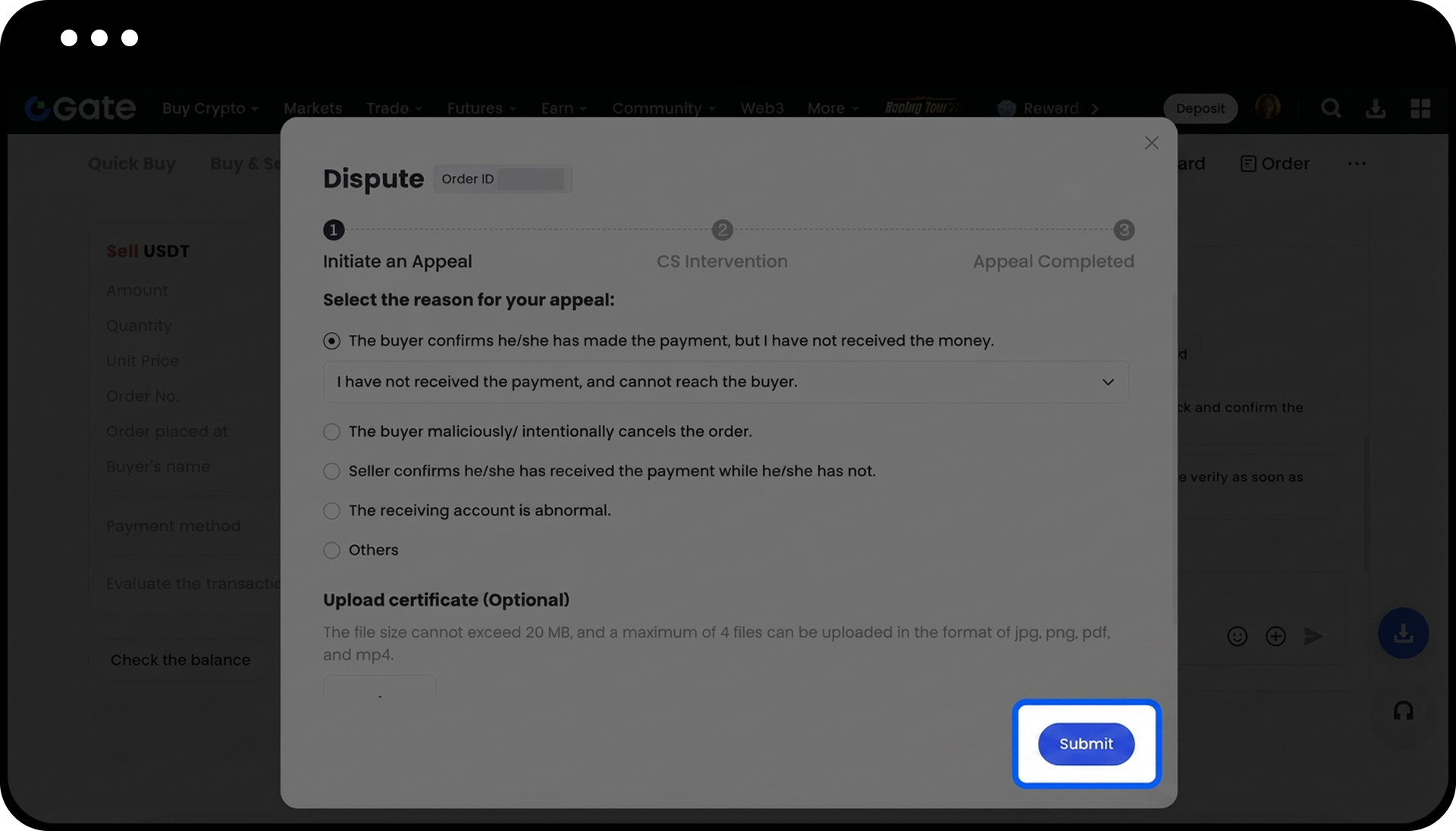
Na página de reclamação, selecione o motivo da sua reclamação no menu suspenso. Carregue as provas relevantes, incluindo capturas de ecrã do pagamento e registos de chat. Clique em [Submeter] para concluir a apresentação da sua reclamação.
Passo 4: Forneça as Provas Necessárias
Submeta as provas adequadas de acordo com o seu papel na transação:
| Provas Necessárias | Para Compradores / Para Vendedores |
|---|---|
| Registos de transação e verificação por vídeo | Certifique-se de que as seguintes informações estão claramente visíveis: a. Consegue aceder com sucesso à sua aplicação bancária. O login biométrico é aceite. Se utilizar login por palavra-passe, inicie a verificação por vídeo a partir da página de autenticação de dois fatores. b. Navegue até à página da conta, mostrando claramente o seu nome completo e número da conta bancária. c. Vá para a página de histórico de transações. d. Mostre o valor da transação, nome do destinatário/pagador e data e hora do pagamento. |
| Extrato Bancário Oficial | Certifique-se de que o extrato bancário oficial emitido pelo seu banco mostra claramente as seguintes informações relativas à transação em questão e submeta-o em formato PDF: a. Nome da sua conta b. Número da sua conta c. Detalhes da transação d. Informação da conta da contraparte. e. Valor da transação |
Passo 5: Retirar uma Reclamação (Se Necessário)
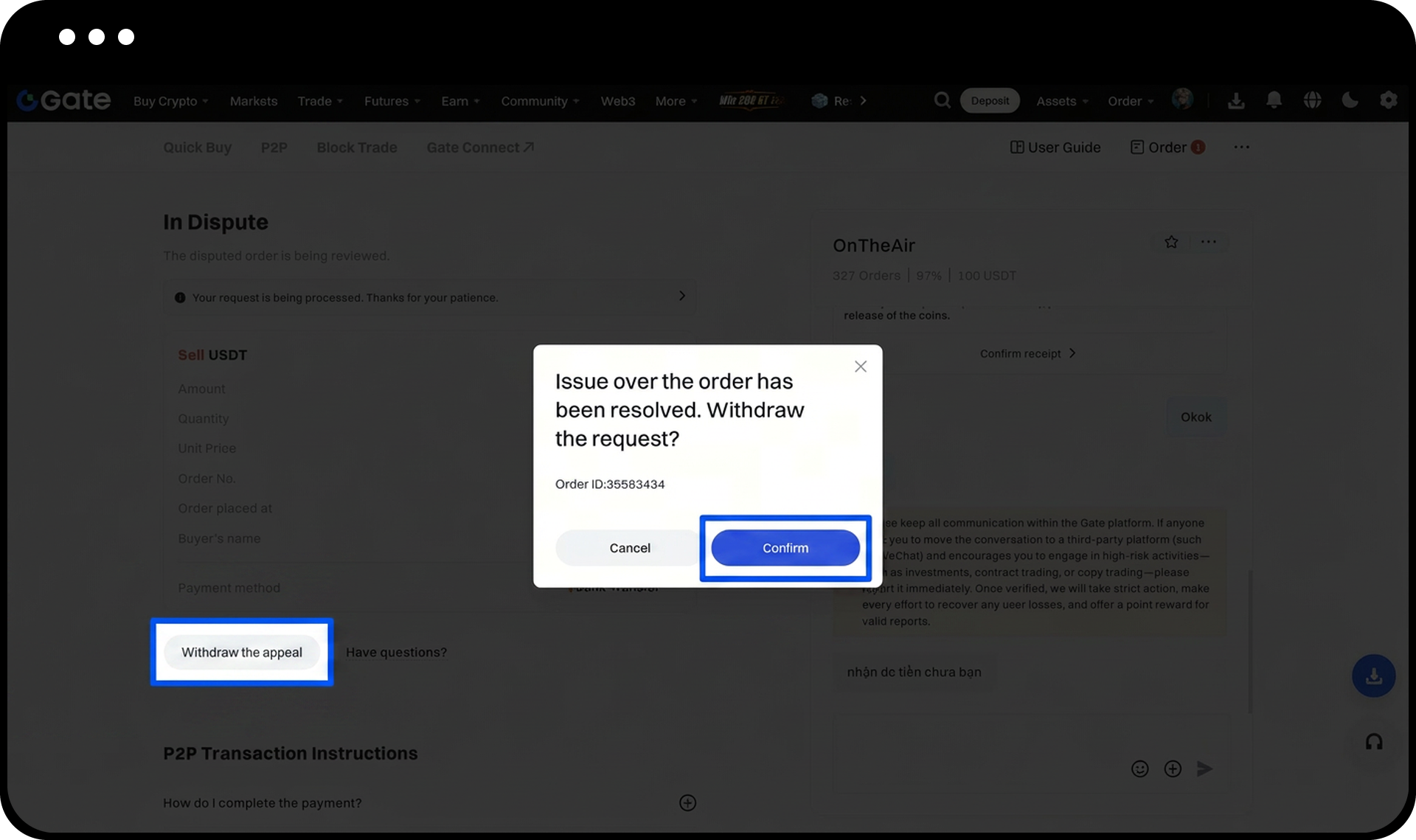
Se precisar de retirar a sua reclamação, localize o botão [Retirar a reclamação] no canto inferior direito da página de detalhes da ordem. Clique no botão e confirme a sua ação na janela pop-up para concluir a retirada.
Notas
- A equipa de apoio ao cliente P2P irá juntar-se ao chat da ordem dentro do tempo estimado e processar as reclamações por ordem de chegada.
- A Gate não se responsabiliza por perdas de ativos causadas pelo facto de os utilizadores não tomarem as ações necessárias dentro dos prazos especificados.
- A Gate não se responsabiliza por perdas de ativos resultantes de transações privadas realizadas fora da plataforma P2P da Gate.
- Todas as transações P2P devem ser efetuadas através da plataforma oficial de negociação P2P da Gate.
- As funcionalidades do produto, interfaces, regras e estruturas de taxas podem ser atualizadas a qualquer momento.
FAQ
Q1: Quando devo submeter uma reclamação em vez de contactar diretamente a contraparte?
R: Submeta uma reclamação quando a comunicação direta com a contraparte não tiver resolvido o problema ou quando a contraparte não responder às suas mensagens.
Q2: Que provas devo fornecer para apoiar a minha reclamação?
R: Forneça registos de transação com verificação por vídeo mostrando o login na sua aplicação bancária, informações da conta e detalhes da transação. Também são aceites extratos bancários oficiais em formato PDF, devendo estes mostrar claramente os detalhes da sua conta, informações da transação e dados da contraparte.
Q3: Posso cancelar a minha reclamação depois de a submeter?
R: Sim, pode retirar a sua reclamação antes de a equipa de apoio ao cliente iniciar o seu processamento, clicando no botão [Retirar a reclamação] na página de detalhes da ordem e confirmando a sua decisão.
Q4: Quanto tempo demora o apoio ao cliente a analisar a minha reclamação?
R: A equipa de apoio ao cliente P2P processa as reclamações por ordem de chegada. A equipa irá juntar-se ao chat da sua ordem dentro do prazo estimado e prestar assistência de acordo com a ordem na fila.
Isenção de responsabilidade
O conteúdo aqui disponibilizado destina-se apenas a fins de referência e educativos, não constituindo qualquer aconselhamento financeiro, de investimento, de negociação ou jurídico, nem representa uma oferta ou solicitação para comprar ou vender quaisquer ativos digitais. A Gate não assume quaisquer declarações ou garantias, expressas ou implícitas, quanto à exatidão, integridade ou atualidade das informações aqui contidas. As funcionalidades dos produtos, interfaces, regras e estruturas de comissões podem ser atualizadas ou ajustadas a qualquer momento. Consulte os anúncios mais recentes e a informação efetivamente apresentada na plataforma Gate para obter os dados mais precisos.
Os investimentos em ativos digitais envolvem riscos significativos, podendo os preços variar substancialmente. Existe a possibilidade de perder a totalidade do montante investido. Tome decisões de forma cautelosa, tendo em conta a sua situação financeira e tolerância ao risco, após compreender plenamente os riscos associados. Se necessário, recomenda-se consultar um consultor financeiro ou jurídico independente.
Para mais informações sobre potenciais riscos, consulte a Divulgação de Riscos e o Acordo de Utilizador da Gate.
